Office 2019 Standard: the latest Office version
After waiting several years, Microsoft launched its latest Office product on the market in October 2018: Office 2019. This is the successor version of Office 2016, which is still in use in many companies. The question now arises as to whether it is worth switching to Office 2019. Of course, this requires a certain investment. But you benefit from many new features. To find out whether the switch is worthwhile for your company, here is an overview of the advantages of the new software.
What new features does Office 2019 offer?
Microsoft is constantly improving its Office software. Many new features are already known from the online version of Office 365. However, if you are currently using the desktop version of Office 2016 or even an older version of the software, then you have not yet been able to enjoy these new functions. Switching to Office 2019 Standard can therefore significantly increase the convenience of editing your documents and the quality of the results.
The new graphics functions are of great importance. With just a few mouse clicks you can now add interesting graphic effects to Word, Excel or Powerpoint that make your presentations and documents even more appealing. The integration of a translation program is also very practical. If you prepare documents for customers and business partners from abroad, you can have individual words or entire sentences translated directly within the document. Creating mathematical formulas is not easy on the computer. However, this is now changing with the support of LaTeX syntax in Word. This allows you to create mathematical equations and formulas in no time. Morph is the name of an extension that makes your PowerPoint presentations much more appealing. Animations, flowing transitions and moving objects – you can now easily create all of this with Morph. In addition, PowerPoint now offers the new zoom function. This allows you to make your presentation even more dynamic. If necessary, you can easily jump back to individual images or sections during the presentation to clarify the relevant content again.
Office 2019 or Office 365: What are the differences?
Office 2019 is the name for the desktop version of this software. You can download this and only have to pay for a license once. You can then use them without restriction. Office 365 is the subscription version of Microsoft Office. The functions are largely the same. However, you have to pay a monthly or annual fee for this. Once you stop paying, your license will expire.
Office 2019 Standard compared to other versions
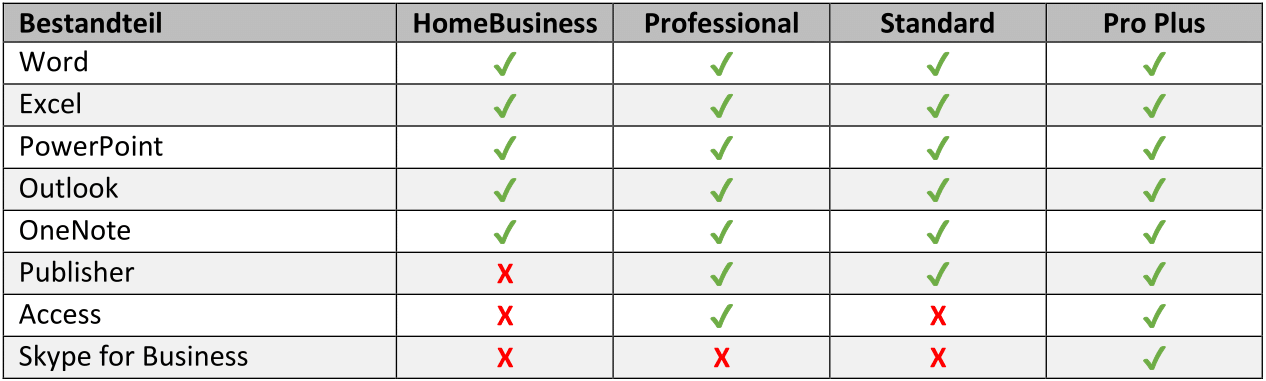
If you want to buy Office 2019, you have several different versions to choose from. All versions include the basic Office programs Word, Excel, PowerPoint, Outlook and OneNote. The Professional, Standard and Professional Plus versions also include the Publisher program. The Professional and Professional Plus versions also have the Access database software. Differences don't just exist in terms of equipment. The licensing system is not always the same either. The Home & Business and Professional versions are only available as individual licenses. However, if you want to equip your entire company, then it is a good idea to use the Standard or Professional Plus version. These are also available as volume licenses.
Operating system: Windows 10 and Windows 10S
RAM: at least 2 GB RAM
Hard drive: at least 3 GB of available storage space
Screen: at least 1,024 * 768 pixel resolution
Graphics card: DirectX 10 support required for GPU accelerated interface
Browser: Current versions of Internet Explorer, Chrome, Firefox, Microsoft Edge or Safari
.NET version: at least .NET version 3.5
| System: |
Windows |
| Contains: |
Word, Excel, Publisher, PowerPoint, Outlook |
| Year: |
2019 |
Note:
This product is one Download version. After receipt of your payment, you will receive the download link for installation and the license key to activate the software directly by email.


